Save and reopen an interval view
Suppose we want to send someone a persistence interval together with the cycle chosen to represent it. We can put two prepared views in one HTML file: an overview of the barcode and a selected interval with its coefficient readout. The recipient can switch between them in a browser with Julia closed.
The saved session guide includes a prepared ring viewer where you can try these two choices before making your own file.
We will use a small image ring. Its eight outer squares enter at zero and its centre enters at five, so first homology has the interval [0,5). The default coefficients are in F2, the field with two elements. Asking for representatives retains the reduction data needed to recover a cycle, a chain whose boundary is zero, and the chain that fills it at death.
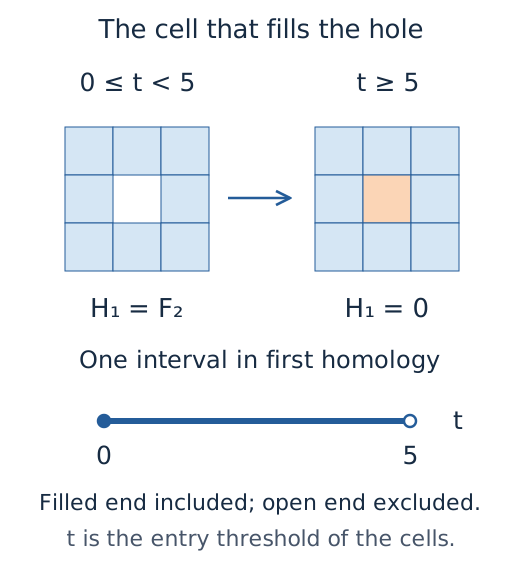
The schematic gives the interval we expect to save. Its left endpoint is included; the class is gone when the central cell enters at five.
import TamerOp as OP
using CairoMakie
A = OP.Advanced

values = zeros(Int, 3, 3)
values[2, 2] = 5
diagram = OP.cubical_persistence(values; representatives=true)
session = OP.inspection_session(diagram; dim=1, window=(-1, 6))
overview = OP.visual_state(session)
visual_state captures an independent copy of the selected view and its readout. The window shows some space on either side of the interval; it does not change the endpoints. We can now select the interval and capture a second state without changing overview.
Equal intervals can share one displayed group. The member identifies an original interval within that group, so the representative query has a specific target. There is just one member in this example. Here A abbreviates OP.Advanced, which provides the selection operations.
A.select_inspection!(session; interval=1, member=1, representative=true)
selected = OP.visual_state(session)

mkpath("shared")
path = joinpath("shared", "ring.html")
OP.save_visual_session(path, (overview=overview, selected=selected);
    selected=:selected,
    caption="The first homology interval [0,5): the ring's cycle is filled when the middle square enters at five.")
A.close_inspection!(session)
@assert isfile(path)
abspath(path)
Open the printed path in a browser. The Saved view selector switches between overview and selected, even after Julia closes. In the selected view, the barcode and persistence diagram identify [0,5), while the readout lists the cycle and its filling with their cell identifiers and coefficients. Those identifiers do not supply source geometry; this example shares the algebraic readout. The cycle is the representative chosen during reduction.
The file contains its drawings and controls, so it can be moved or copied without accompanying resources. On a narrow screen, scroll across the figure to read all its panels. Download selected values gives the exact recorded data behind the current view, and Download selected SVG saves its drawing. The browser chooses between the answers already in the file; it does not run a new persistence calculation.
To read the saved selection in a fresh Julia session, start from the same working directory. Loading needs TamerOp but no plotting package:
import TamerOp as OP
A = OP.Advanced

saved = OP.load_visual_session(joinpath("shared", "ring.html"))
@assert Set(A.visual_session_states(saved)) == Set((:overview, :selected))
selection = A.inspection_selection(saved; state=:selected)
@assert selection.interval == 1 && selection.member == 1
@assert selection.representative
selection
To resume this supported interval inspector in Julia, include object=diagram in the saving call, then call OP.inspection_session(saved; state=:selected) after loading the resulting file. This retains the mathematical source in addition to the views, checks it against the captured selections, and increases the file's size. Saving the diagram alone would retain the result without our chosen views.
The guide to saved sessions develops the same choices with an encoding and exact parameter queries. The session reference gives the supported objects and the conditions for reconstructing a live inspector.